All projects

Security Engineering

Self-Hosted Network-Wide DNS Security Gateway

Raspberry Pi DNS filtering at home and on the go

Linux logo

Home security project

Operational
Network SecurityRaspberry PiLinuxDNSAdGuard HomeUnboundDNSSECTailscaleUFW
Protected access
2 paths

Local LAN and encrypted tailnet

Client-facing DNS
:53

AdGuard is the single policy layer

Recursive backend
Loopback

Unbound listens on 127.0.0.1:5335

Public forwards
Zero

No DNS, SSH or admin exposure

What this showed

A working DNS filter at home and on the go, with private remote access and no public DNS, SSH or admin ports.

What I learned

Small services can still get complicated. Checking the interface, client DNS settings, listening ports and firewall after each change made the setup much more reliable.

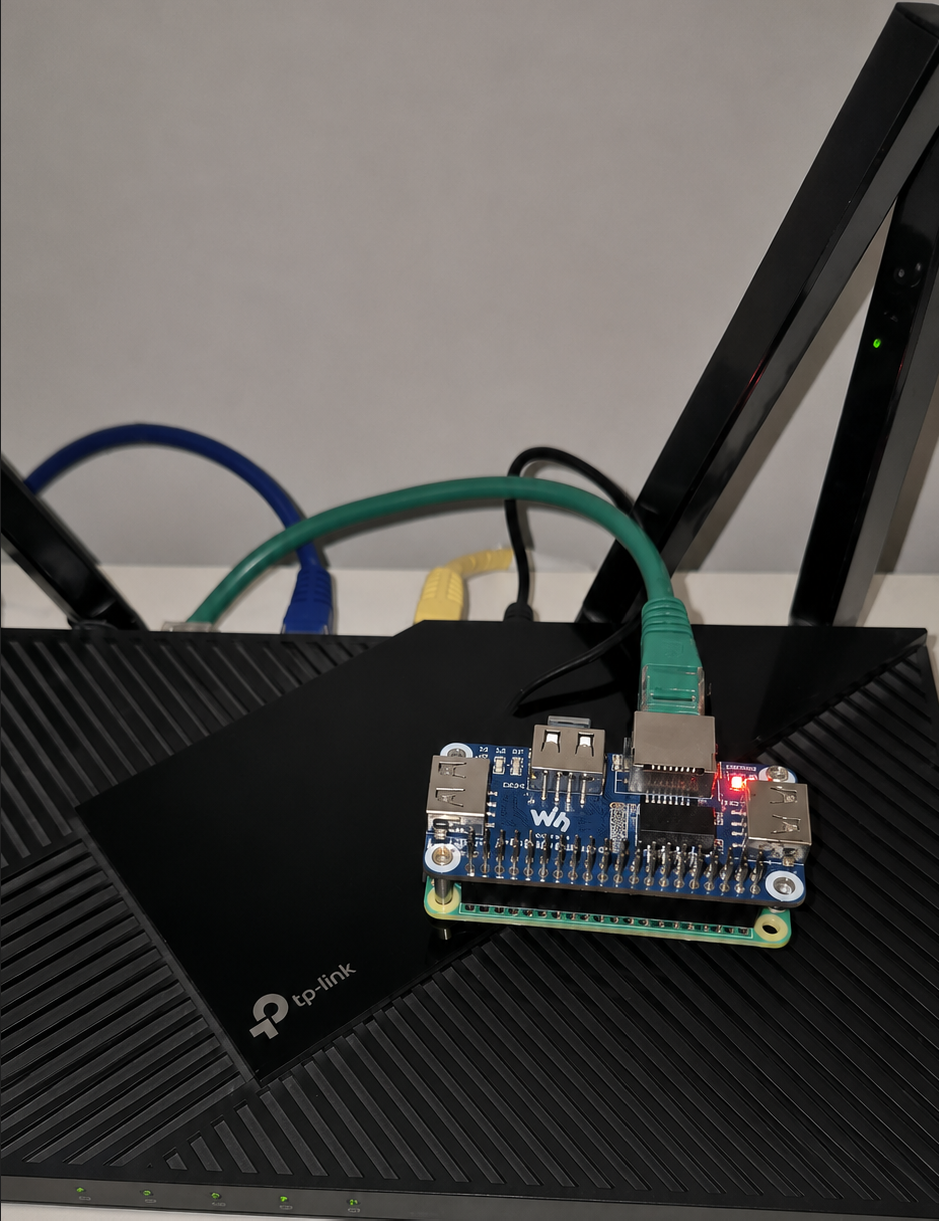
The physical build

One filter for every network I use
At home, it removes ads and trackers for the whole network. Away from home, my phone and laptop keep the same protection on public Wi-Fi and mobile data.

Raspberry Pi Zero 2W with a Waveshare Ethernet and USB HAT installed on a TP-Link router

Raspberry Pi Zero 2W + wired Ethernet HAT

A stable, always-on service path to the home router.

Design principle

Private DNS protection, wherever I connect.

Ads, trackers and known malicious domains are blocked before they load. Safe requests are resolved privately, and Tailscale gives my own devices that protection without opening the Pi to the Internet.

AX55
Routing + DHCP
AdGuard
Policy + visibility
Unbound
Recursion + DNSSEC
Tailscale
Private remote path
Wired Ethernet keeps this shared network service stable.

Architecture at a glance

How a DNS request moves

Whether I am home or on public Wi-Fi, trusted devices use the same filter. Blocked domains stop first; safe requests continue privately.

Security serviceNetwork hop

At home

Every device gets ad, tracker and malicious-domain blocking.

  1. LAN devicesTrusted clients
  2. Archer AX55Advertises Pi DNS
  3. AdGuard Home:53 · filter + log
  4. UnboundLoopback :5335
  5. DNS hierarchyRoot · TLD · authority

On public Wi-Fi or mobile data

My personal devices keep the same protection through Tailscale.

  1. Phone / laptopAway from home
  2. TailscaleEncrypted private path
  3. AdGuard Home:53 · same policy
  4. UnboundLoopback :5335
  5. DNS hierarchyRecursive answer

Allowed

LAN + tailnet → AdGuard :53

Two authenticated or trusted client paths.

Internal only

AdGuard → Unbound :5335

The recursive backend stays on loopback.

Not exposed

Internet → DNS / SSH / admin

No public service forwarding on the router.

Practical checks

Proof it works

01 / Resolver boundary

Test used

sudo ss -luntp | grep -E ':(53|5335)\b'

Confirmed

AdGuard accepts client DNS on :53. Unbound is reachable only on 127.0.0.1:5335.

Devices cannot skip the filter and query the recursive resolver directly.

02 / DNSSEC negative test

Test used

dig @PI_DNS dnssec-failed.org

Confirmed

A deliberately broken DNSSEC domain was rejected. Valid signed domains continued to resolve normally.

This checks that forged or broken DNSSEC answers do not silently pass through.

03 / Public exposure

Test used

nmap -Pn -p 22,53,80,443 PUBLIC_IP

Confirmed

No DNS, SSH or admin service was reachable from the public Internet.

Tailscale provides remote protection privately, so the router needs no inbound forwarding.

What stood out

Backend Resolver Isolated from Clients

What I saw

Unbound listens only on 127.0.0.1:5335 and accepts queries from AdGuard Home on the same host.

Why it matters

LAN and tailnet clients cannot bypass filtering or turn the backend into an exposed recursive resolver.

Why it happened

An earlier configuration include caused Unbound to bind more broadly than the intended design.

What would help

Keep one authoritative Unbound configuration, validate effective listeners after changes and deny port 5335 externally.

Private Remote DNS Without Port Forwarding

What I saw

Tailscale advertises the Pi's private tailnet address as global DNS for trusted devices; the AX55 has no Pi service forwards.

Why it matters

Remote devices retain the home filtering policy without placing DNS, SSH or the admin interface on the public Internet.

Why it happened

Remote access is useful, but conventional port forwarding would unnecessarily expand the appliance's attack surface.

What would help

Keep remote access on the authenticated tailnet, review device membership and preserve the no-public-forwarding design.

DNS Policy Applied at Both Entry Paths

What I saw

AX55 DHCP supplies only the Pi as DNS on the LAN, while Tailscale Override DNS directs remote devices to the same AdGuard service.

Why it matters

Clients receive a consistent filtering and logging policy instead of silently falling back to an unfiltered secondary resolver.

Why it happened

DHCP, IPv6, browser DoH, VPNs and endpoint overrides can each select a different resolver.

What would help

Audit resolver selection across protocols and endpoints, then correlate tests with the AdGuard Query Log.

Availability on Resource-Constrained Hardware

What I saw

Aggressive filter combinations produced high single-core utilization on the Pi Zero 2W during testing.

Why it matters

Resolver latency or failure can make dependent clients appear to have lost Internet connectivity.

Why it happened

Overlapping blocklists and recursive resolution competed for limited CPU and 512 MB of memory.

What would help

Use a moderate non-overlapping list set, monitor utilization, maintain recovery procedures and scale hardware if demand grows.

How I put it together

Six focused steps, from the wired setup to checking that it works.

  1. 01Set up the Pi on a stable wired connection and reserved its LAN address.
  2. 02Put AdGuard in front of Unbound so clients have one DNS entry point.
  3. 03Used router DHCP to point home devices at the Pi, without a backup DNS that could skip filtering.
  4. 04Used Tailscale to give my own remote devices the same DNS path without opening a router port.
  5. 05Added default-deny firewall rules and allowed only the trusted paths needed.
  6. 06Checked normal and blocked requests, DNSSEC, open ports, firewall rules and remote resolution.